🎯
Multi-Project Dashboard
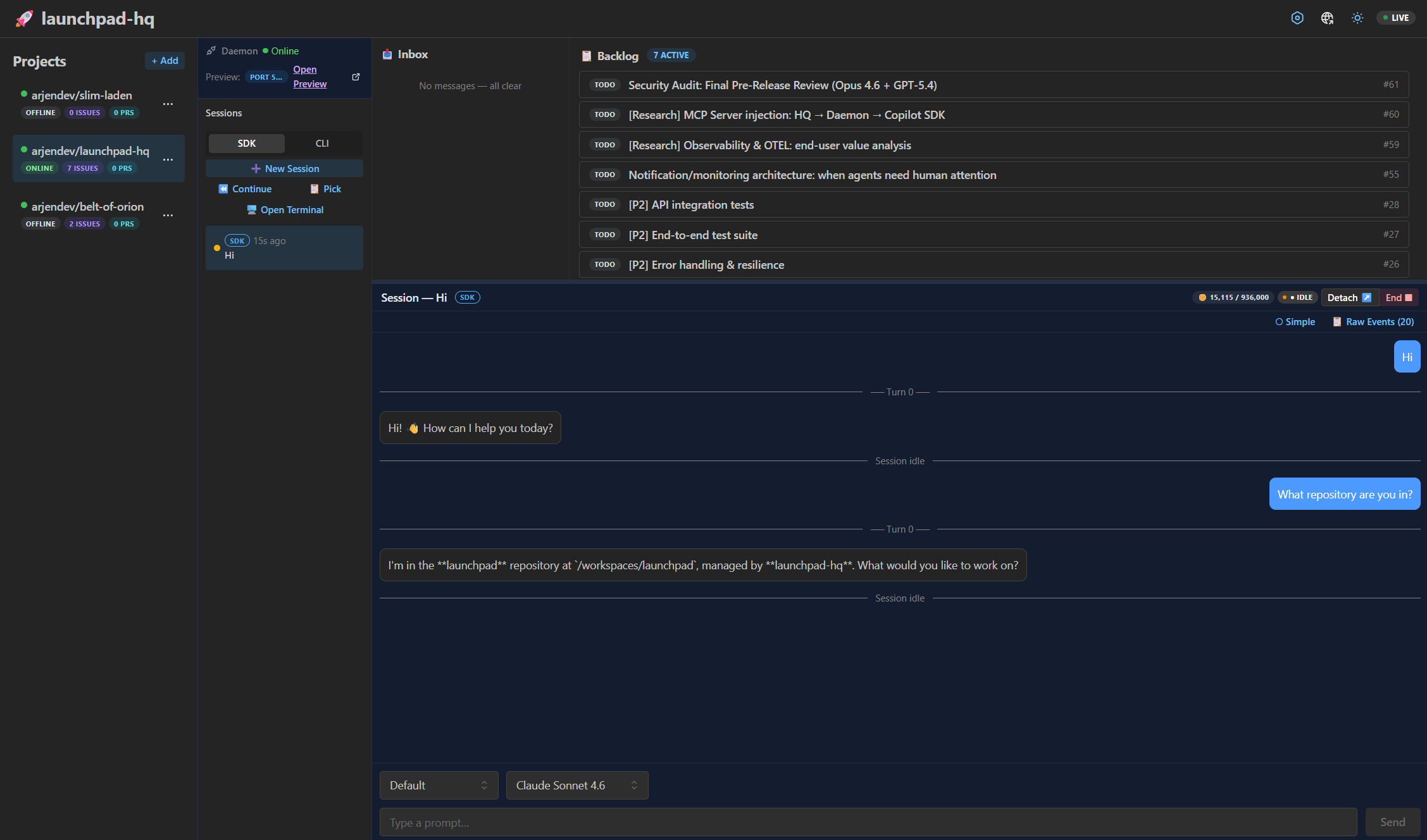
All your repos in one three-pane mission control. Issues, PRs, sessions at a glance. Badge counts tell you where to focus.
Track all your projects, every Copilot session, every tool call — from one dashboard. Today it's about visibility, productivity and peace of mind. Tomorrow, we'll add Context Hub — where your context, skills and tools follow every agent safely, everywhere.
Soon, Launchpad becomes your Context Hub — define skills, connect MCP servers, share context across projects. Every Copilot session starts smarter because your tools and knowledge follow you everywhere.
🧠 Context Hub — MCP servers, custom instructions, shared skills — configured once in HQ, deployed to every agent automatically.
📊 Token Usage & Observability — Know where your AI spend goes across all projects.
1. Install and launch
npx launchpad-hq2. Add a project
Point HQ at any GitHub repo. It picks up issues, PRs, and spins up a daemon.
3. Open the dashboard
Three-pane mission control: projects → kanban → live sessions. Drill from overview to introspection.